If you use CodeRush Xpress with Windows Vista you may experience continuous crash of the environment.
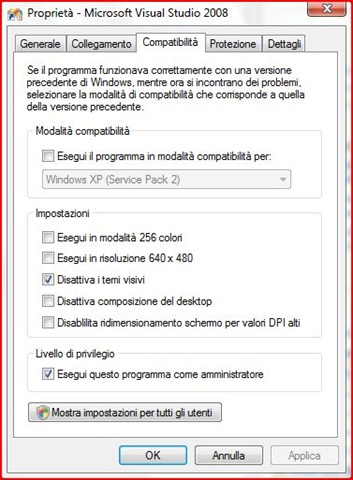 To resolve this issue you can right click on the Visual Studio exe (or link in the startup menu) and go to the compatibility tab.
Then put a check on ‘Disable visual theme’ and ‘Execute as administrator’...the translation may not be accurate cause my OS is in Italian (look at the picture below).
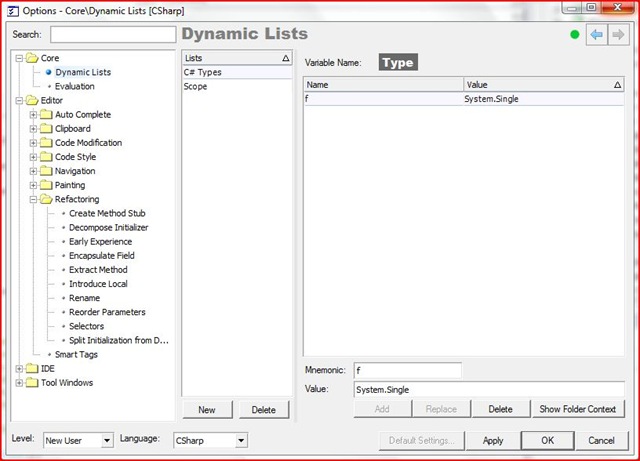 Plus CodeRush Xpress do not appear to have any menu attached to the normal menu bar of Visual Studio 2008. To open its control panel you can use the following key combination:
ctrl+alt+shift+o
Related Content
- NUnitit: Visual Studio Addin to support NUnit and some customizations to it (26/08/2015)
- Resharper and the OutOfMemoryException problem (26/08/2015)
- Spot Hidden Exceptions using IntelliTrace (26/08/2015)
- Visual Studio 2010 designer error: Value cannot be null. Parameter name: objectType (26/08/2015)
- VS2008 SP1 + PowerCommands = Toolbox AddItems...Crash! (26/08/2015)
- How to update your TFS Workspace after CodePlex upgrade to TFS2010 (26/08/2015)
- More related document (8)