Given the ListViewWebPart with advanced filtering capabilities we wrote in the previous articles, we want to extend it again and provide the ability to select which user (or users) we will use to filter our data out.
We can just write a simple web part that wraps the standard PeopleEditor control that comes with WSS or SharePoint.
The code is pretty straightforward, the PeopleEditor will be created and added to the Controls collection of the web part in the CreateChildControls() function. We will parse the data that the control exposes in the ITransformableFilterValues.ParameterValues property: each valid selected user will be contained in the PeopleEditor.ResolvedEntities collection (which contains PickerEntity objects).
The full code is listed below:
[Guid("4fddd9c3-37bf-48b9-84a2-0b4d96f98f92")]
public class SelectedUserFilterWebPart : wsswebparts.WebPart, wsswebparts.ITransformableFilterValues
{
private PeopleEditor _pplEditor;
private Button _btnApplyFilter;
protected override void CreateChildControls()
{
base.CreateChildControls();
_pplEditor = new PeopleEditor();
Controls.Add(_pplEditor);
_btnApplyFilter = new Button();
_btnApplyFilter.Text = "Apply Filter";
Controls.Add(_btnApplyFilter);
}
private List<String> GetSelectedEntries()
{
List<String> selectedEnties = new List<String>();
try
{
foreach (PickerEntity entity in _pplEditor.ResolvedEntities)
{
if (entity.IsResolved)
{
selectedEnties.Add(entity.DisplayText);
}
}
}
catch (Exception)
{
}
return selectedEnties;
}
// Implementations of the ITransformableFilterValues properties.
[wsswebparts.WebPartStorage(wsswebparts.Storage.None)]
public virtual bool AllowMultipleValues
{
get
{
return true;
}
}
[wsswebparts.WebPartStorage(wsswebparts.Storage.None)]
public virtual bool AllowAllValue
{
get
{
return true;
}
}
[wsswebparts.WebPartStorage(wsswebparts.Storage.None)]
public virtual bool AllowEmptyValue
{
get
{
return true;
}
}
[wsswebparts.WebPartStorage(wsswebparts.Storage.None)]
public virtual string ParameterName
{
get
{
return "SelectedUser";
}
}
[wsswebparts.WebPartStorage(wsswebparts.Storage.None)]
public virtual ReadOnlyCollection<string> ParameterValues
{
get
{
List<String> data = GetSelectedEntries();
if (data.Count == 0)
return null;
return new ReadOnlyCollection<string>(data);
}
}
// Use the ConnectionProvider attribute to specify the method that the Web Part
// Framework should call to allow us to return an instance of our ITransformableFilterValues interface.
[aspnetwebparts.ConnectionProvider("Selected User Filter", "ITransformableFilterValues", AllowsMultipleConnections = true)]
public wsswebparts.ITransformableFilterValues SetConnectionInterface()
{
return this;
}
}
Here’s a screenshot of the web parts in action.
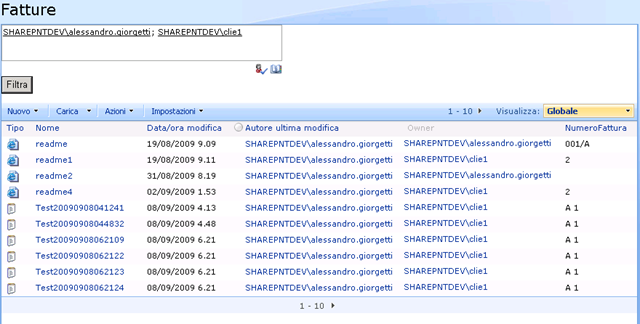
With this solution you can filter on the currently logged user, or a user of your choice even in WSS without having to rely on MOSS extensions.
Related Content
- WSS/SharePoint: create a Current User Filter Web Part (09/07/2009)
- WSS / SharePoint: adding filtering capabilities to the CustomListViewWebPart - Filter Chain Fixed (11/06/2009)
- WSS / SharePoint: adding filtering capabilities to the CustomListViewWebPart (Current User Filter and others) (09/11/2009)
- More related document (1)