During the last days I had to put my hands on an hold project written for .NET Framework 1.1 and convert his database from Access to SQL Express 2005, the conversion was quite easy but then the deployment phase stepped in.
We had the requirement of allowing the deployment of the database engine along with the application (ClickOnce is not an option in VS.2003 :D), the Setup project that comes along with VS 2003 rely on merge modules to install external components, but unfortunately no merge module exists for SQL Express (they have been deprecated). So I started looking around for a solution and I came to this msdn article: Embedding SQL Server Express into Custom Applications.
Basically they suggest to write down a wrapper around the installation of the two components (SQL Express and the application) and launch the SQL installer in unattended mode with a shell command like: “start /wait setup.exe /qb /settings c:\template.ini” in which the configuration settings are passed in using the template.ini file or passing all the configuration parameters as command line arguments.
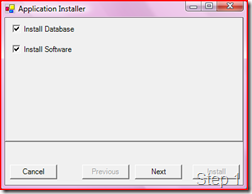
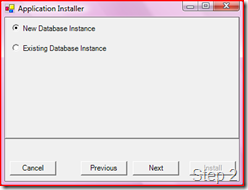
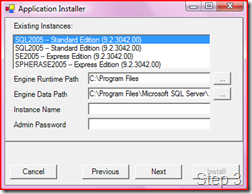
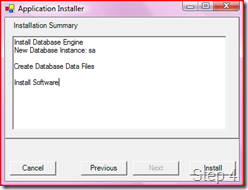
So I took out the code they present in the article, corrected a few minor problems and created a basic installation wrapper that offer the option to select if install the SQL Engine (along with the database files or with a series of scripts to create the databases...this implementation is left to you in this sample project), one or more MSI packages that install the real application software or both.
The wizard is graphically ugly to see (some screens follows) and you need to customize it to fir your company installation templates styles; the code behind surely need some refactoring but it actually works.
 To be used the Installation Bootstrap requires that the SQLEXPR.EXE and the application MSI files are placed in the same directory of the bootstrap itself.
Converting this project to be used with VS 2005/2008 and the new .NET Framework is really easy.
Sample project:
We had the requirement of allowing the deployment of the database engine along with the application (ClickOnce is not an option in VS.2003 :D), the Setup project that comes along with VS 2003 rely on merge modules to install external components, but unfortunately no merge module exists for SQL Express (they have been deprecated). So I started looking around for a solution and I came to this msdn article: Embedding SQL Server Express into Custom Applications.
Basically they suggest to write down a wrapper around the installation of the two components (SQL Express and the application) and launch the SQL installer in unattended mode with a shell command like: “start /wait setup.exe /qb /settings c:\template.ini” in which the configuration settings are passed in using the template.ini file or passing all the configuration parameters as command line arguments.
So I took out the code they present in the article, corrected a few minor problems and created a basic installation wrapper that offer the option to select if install the SQL Engine (along with the database files or with a series of scripts to create the databases...this implementation is left to you in this sample project), one or more MSI packages that install the real application software or both.
The wizard is graphically ugly to see (some screens follows) and you need to customize it to fir your company installation templates styles; the code behind surely need some refactoring but it actually works.
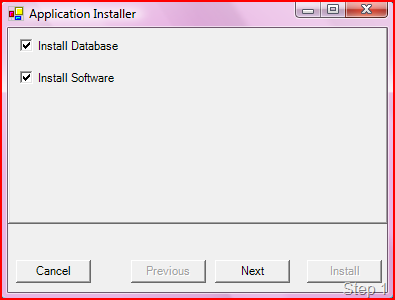
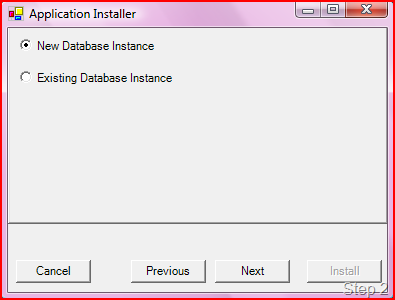
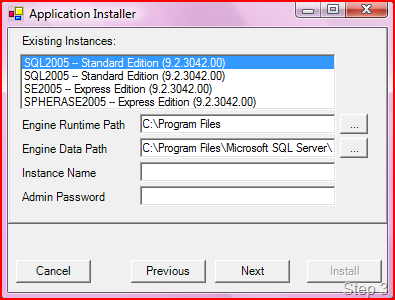
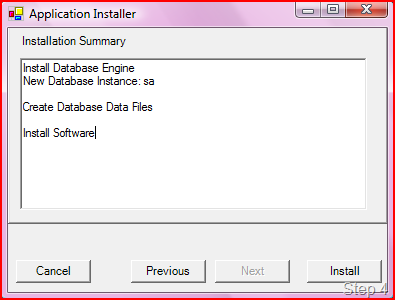 To be used the Installation Bootstrap requires that the SQLEXPR.EXE and the application MSI files are placed in the same directory of the bootstrap itself.
Converting this project to be used with VS 2005/2008 and the new .NET Framework is really easy.
Sample project:
Related Content
- Sql Server - Scramble / Mask database production data (26/08/2015)
- NHibernate.Envers - Customize the Revision Entity (08/05/2011)
- How to update your TFS Workspace after CodePlex upgrade to TFS2010 (26/08/2015)
- NHibernate - prepare_sql and some considerations on mapping very long string fields (26/08/2015)
- Silverlight / WCF: fixing the Custom WCF Proxy Generator (26/08/2015)
- More related document (6)